Building a compositor for a userbase of one
July 14, 2026
Every desktop I've ever used manages windows one of two ways, and both are frustrating.
Floating window managers (Windows, macOS, every mainstream desktop) are shuffling papers on a desk. New windows land wherever, on top of whatever you were doing, and organizing them is entirely your job, forever, by hand. The computer contributes nothing; it's furniture.
Tiling window managers (Hyprland, i3, the whole lineage) fix that by going too far the other way: open one window and the entire desk rearranges itself. Everything reshapes, everything resizes, your carefully sized editor is suddenly half its width because a terminal showed up. The computer contributes too much, and it contributes the same rigid grid no matter what you're actually doing.
So I built Resonance: a spatial compositor. Windows don't float in an unmanaged pile and they don't get flattened into a grid; they live on stacked levels, like floors of a building. A window opens on the ground floor. If it would land on top of something already living there, it gets demoted a floor up instead of covering it. If space exists on a floor below for it, it gets promoted back down. Each floor sits visually inset from the one below, so depth reads at a glance, and the compositor remembers which floor and which spot every app belongs in. A blend between Windows and a tiling manager.
There was no way to bolt this onto an existing desktop, so I built the
compositor itself. I started from TinyWL, the ~500-line educational
compositor that ships with wlroots as a teaching example, and did the Ship of
Theseus thing. Boot into it, understand every part, replace planks one at a
time until the boat is something else entirely. Today tinywl.c is ~4,700 lines
and the filename is the only original plank left.
One constraint made this interesting: Resonance is my live daily environment. There is no test rig. Every compositor change gets built and then booted into as the actual session, which is a strong incentive to make small, reversible changes and to understand exactly what each one does before committing to it. Living in the compositor ensures this isn't just a fun weekend project; it's something whose success I have to guarantee.
What a compositor actually has to do
A compositor is not quite a "desktop" like Windows; it's more of a director. It tells the GPU what to draw and the applications where they're allowed to exist. On Wayland, the compositor is the display server, window manager, and input handler in one process. Every frame any app draws, every keystroke, and every cursor movement passes through it. wlroots (TinyWL's dependency) handles the brutal low-level parts (DRM, GPU buffers, input devices, protocol plumbing) and hands you building blocks; everything above that is yours to write.
Stock TinyWL supports exactly one shell protocol, two hardcoded keybindings, and no configuration. Getting from there to something I could actually live in meant building out, plank by plank, everything a real desktop quietly does for you:
- Multi-monitor output layout. TinyWL auto-arranges outputs; Resonance lays out my two displays (2560×1440 and 1920×1080, the smaller one vertically centered against the larger) and tracks which one the cursor is on, publishing it so overlays can open on the monitor I'm looking at.
- XWayland. Proxied X11 windows. Without this, Steam and half of everything else simply doesn't run. Every window-management feature in Resonance had to be implemented twice, once for native xdg-shell toplevels and once for XWayland surfaces, because the two APIs share almost nothing.
- Layer-shell. The protocol that lets overlays, notifications, and panels dock above or below normal windows. Resonance's own overlay tools ride on this.
- Server-side decorations. Wayland apps expect the compositor to say whether it draws window borders. Resonance does, by hand (more below).
- Screen capture. A bespoke wlroots screencopy manager, so frames can be pulled out of the live scene for screen sharing and screenshots, plus a foreign-toplevel manager so capture tools can enumerate windows.
- Pointer constraints and relative pointer motion. Without these two protocols, first-person games spin wildly the moment you touch the mouse.
- Drag-and-drop. Rendering the drag icon that follows the cursor between windows; another thing you never notice a desktop doing until it's your job.
- The IPC port. The plank everything else in Resonance stands on, described next.
The IPC port: the compositor executes, the brain decides
The most important architectural decision in Resonance is that the compositor
contains no policy. It knows how to place a window; it never decides
where. All decisions live in a Python process (core/brain.py and
core/placement.py), and the two sides talk over a Unix socket at
/tmp/resonance.sock using a newline-delimited text protocol.
Compositor to brain:
| Message | Meaning |
|---|---|
window-map: | a window appeared (app_id, title, geometry, numeric id, fullscreen flag, tab-separated) |
window-geometry: | a window moved or resized |
window-unmap: | a window closed |
release: | an interactive drag/resize just ended (mouse-up) |
keybind: / gesture: | a bound key or gesture fired |
cursor-pos: | global cursor position, throttled so raw motion events don't flood the socket |
env: | environment handoff (the compositor tells the brain its WAYLAND_DISPLAY and XWayland DISPLAY) |
Brain to compositor, the entire command vocabulary:
| Message | Meaning |
|---|---|
place:<id> <x> <y> <w> <h> <floor> | put this window here, on this floor |
fullscreen:<id> <0|1> | set fullscreen state |
That's it. Two commands. Even keybindings follow the split: bindings live in
resonance.toml, the brain flattens them to a file the compositor parses at
startup, and when a bound combination is pressed the compositor doesn't run
anything; it sends keybind:Super+Space down the socket and the brain spawns
the process. The C code never grows opinions, which means the part that's
dangerous to change (the thing my session runs inside) stays dumb and stable,
while the part that gets smarter over time is a Python file I can edit and
restart mid-session without dropping a single window.
The brain is a selectors-based socket server that also rebroadcasts every
message to all other connected clients, so any future tool can subscribe to
window events or cursor position without the compositor knowing it exists.
The level system
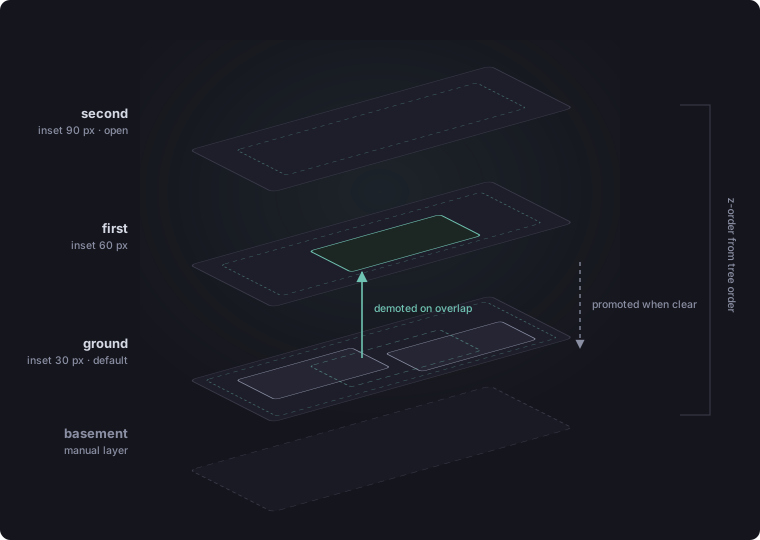
The heart of the spatial model. Windows live on one of four stacked floors:
basement, ground, first, second. In the compositor, each floor is its own
wlr_scene_tree, so z-order between floors falls out of tree order for free
and moving a window between floors is a single reparent. The compositor holds
the trees and reparents on command; which floor a window belongs on is
decided entirely by the brain.
The cascade rule: ground floor by default, and ground is the most important floor; moving away from it is a demotion. When a window maps, the brain checks whether it overlaps any other primary window already living on ground; if so it tries the first floor, then the second, landing on whatever floor has space for it. Nothing that was already open moves an inch. Drag a window onto an occupied spot and it gets demoted a tier on release; drag it clear of everything and it earns promotion back toward ground. The basement is outside the cascade entirely; it's the manual layer, for things deliberately put beneath the workspace.
Nothing done on a floor affects the floor below or above it. Clicking within a window on the ground floor does not cause the window above it to switch floors with it. One of the most frustrating aspects of Windows is that clicking something brings it fully to the front: functionality I've never actually needed.
Each floor is also inset from the monitor edges (30 px on ground, 60 on first, 90 on second; the basement gets none), so higher floors visibly sit further "in" than the ones below and depth reads at a glance. A window dragged past its floor's padding gets clamped back in on mouse release, and the clamp only ever shrinks the offending edges back to the boundary; it never moves or grows a window that fits.
Placement memory
A spatial desktop is pointless if it forgets the space. The brain remembers
where windows belong: the persistent store
(~/.local/share/resonance/placement.json) is a three-axis lookup of app_id,
then floor, then a list of slots, one per simultaneously-open window of that
app on that floor. Open two terminals on the ground floor in the same order
every day and each one keeps landing back in its own spot. Slot claims are
in-memory per session; the remembered geometries persist.
Geometry is only recorded once a window settles: either immediately on mouse release after a drag, or after 3 seconds without geometry changes for app-initiated moves. Comparisons use an 8-pixel tolerance everywhere, so a barely-off drag doesn't trigger a pointless one-pixel correction snap. Every remembered slot is tagged with the monitor it was recorded on, and memory recorded on one output is never replayed onto a window that mapped on a different one; a window straddling a monitor boundary isn't trusted or recorded at all.
The messy edges took the most code:
- Splash screens. Discord, Steam, Audacity, OrcaSlicer, and Kdenlive all throw up a loading window before their real one, and the splash isn't reliably identifiable by title (OrcaSlicer's splash and main window both report "unknown"). So for those app_ids the first window-map since the app was last fully closed is treated as unconfirmed and suppressed from placement entirely; the second distinct map is trusted as the real window.
- Generic identities. Some unparented GTK dialogs report the placeholder app_id "GTK Application" instead of their owner's. Those get gated to one tracked window at a time so a stray dialog can't hijack its host app's remembered position.
- Fullscreen. If a window was remembered fullscreen, exact geometry stops
mattering and only the output does; and because the compositor drops
fullscreen as a side effect of a
place:command, any cross-monitor move has to be followed by afullscreen:to restore it.
Push-resize
Windows on the same floor are solid to each other. Grab a window's edge and resize toward a neighbor and you don't overlap it; you push it. The neighbor slides ahead of the dragged edge, holding a 7-pixel gap, and when it runs out of room against its floor's padded boundary it starts shrinking instead, down to a 100-pixel minimum.
The mechanics:
- At grab time, the compositor scans same-floor windows and picks at most one neighbor per axis: whichever is nearest the dragged edge in the drag direction. Push deliberately doesn't chain past that one neighbor.
- Whether the neighbor actually moves is re-evaluated live on every step of the drag; nothing happens until the dragged edge comes within the gap distance, however far into the drag that is.
- Once pushed, a neighbor stays pushed; retreating the drag doesn't pull it back. This falls out of the state design: the "start" box is updated in place after every push step, so the next step measures from wherever the neighbor currently is, not where it was at grab time.
- Push reads the dragged window's actual committed frame box each step, the same way the border rendering does, rather than predicting from the mouse position. It reacts when the client really resizes, so it never chases an intended-but-not-yet-rendered edge.
After release, the brain settles both windows into placement memory like any other drag, so a layout you pushed into shape is a layout that comes back.
Drawing the chrome myself
wlroots gives you no decorations, so borders are rendered by hand: for each
window the compositor allocates a shared-memory buffer (memfd_create) and
writes the pixels directly in C, no drawing library involved; a 4px
rounded-corner ring, gradient from teal to warm sand, with a translucent dark
glass fill behind dialogs, attached to the scene under the window. Corner
radius is per-app (12px default; zero for things that should sit flush). Unparented
dialogs get the same glass treatment so they read as part of the environment
rather than floating gray rectangles.
The boot sequence gets the same care, because the first thing the environment
does should not be flashing a terminal at you. bootintro.c renders the
wallpaper blurred (three box-blur passes, materially a Gaussian), then fades
in the word mark in Plus Jakarta Sans Light at 96pt, letterspaced, filled
with a vertical teal-to-warm-sand gradient over a blurred drop shadow, with a
subtitle beneath. The phases are hardcoded and unhurried: 2.5 s of sync wait,
2.5 s fade in, 2 s hold, 2 s fade out, and then the desktop is just there.
Not a loading screen; a hello. Auto-start programs are intentionally left
out. I choose what I want to use my computer for, rather than being greeted
at boot by whatever the computer decided to start for me.
Input grew a small gesture recognizer too: holding Super and flicking the
cursor upward (velocity-tracked with accumulated deltas, fired once per
flick) sends gesture:swipe-up to the brain, which maps it through
resonance.toml like any keybinding. Left will go back on Firefox, right
will be forward, and swiping down will bring the page back to the top.
Living in it
The real test of a compositor isn't a demo; it's whether you forget it's there. At time of writing I've been daily-driving Resonance for almost two weeks: work, browsing, editing, and, the part I genuinely expected to hurt, games. Having the level system, plus Super+ providing control over windows at the speed of thought, completely changes how I use a computer. No more hunting for window edges or title bars; I can do what I need without friction.
Games mattered more than anything else here, because games are roughly half of what I do on a computer. If gaming suffered, the project failed, no matter how clever the level system was. It didn't. Games run flawlessly: fullscreen, pointer capture, XWayland titles through Steam, all of it. Input latency sits around 10 ms, framerates are exactly what the hardware should produce, and the pointer-constraints and relative-pointer planks earn their keep every time a first-person camera doesn't spin into the ceiling. There is something quietly absurd about it: a bespoke compositor, rewritten plank by plank around one person, delivering perfectly transparent gameplay as if it were any mature desktop. It's the strongest evidence I have that the boat actually floats.
In those two weeks it has crashed exactly once, and the culprit was Godot's window associate/disassociate dance, which managed to hit a path no other app touches. One crash, one known cause. For a C program I rewrote around myself while living inside it, I'll take that.
The honest caveats
Plenty of this system is hardcoded: the output layout, the floor insets, the boot image path, and more besides. That's not sloppiness so much as scope; Resonance is built for exactly one machine and one user, and generalizing numbers that only ever need to be right once would be effort spent on a user who doesn't exist. The known potential bugs are documented in a standing review file (blocking IPC writes, a few protocol corners cut), and in almost two weeks of daily driving none of them has actually become an issue. I keep the list for when these errors rear their ugly heads.
The bigger truth is that everything described here is the framework, not the destination. What comes next is the system Resonance is actually named for: input velocity reading my current state, gravity weights learning which apps belong together, context deciding what surfaces when. All of it will drive placement through the same two IPC commands the current brain uses; the spatial compositor was built as the stage, and the learning system is what walks onto it next.
Of everything I've built, this is the one I'm proudest of. I know because I'm typing this inside it.
Code to be uploaded to GitHub